TEPY
AI physiotherapy for muscle pain: record where it hurts, get a plan of self-massage and exercises, follow it on video.
- Role
- Fullstack developer: the whole mobile app and its Cloud Functions
- Client
- TEPY
- Period
- 2023 – today
- Platforms
- iOS and Android from one Flutter codebase
The product
TEPY turns the first visit to a physiotherapist into a conversation with the phone. You show it where it hurts on a 3D body, how much, since when, what it feels like and which movements set it off; it answers with a plan of self-massage and exercise sessions spread over the following weeks.
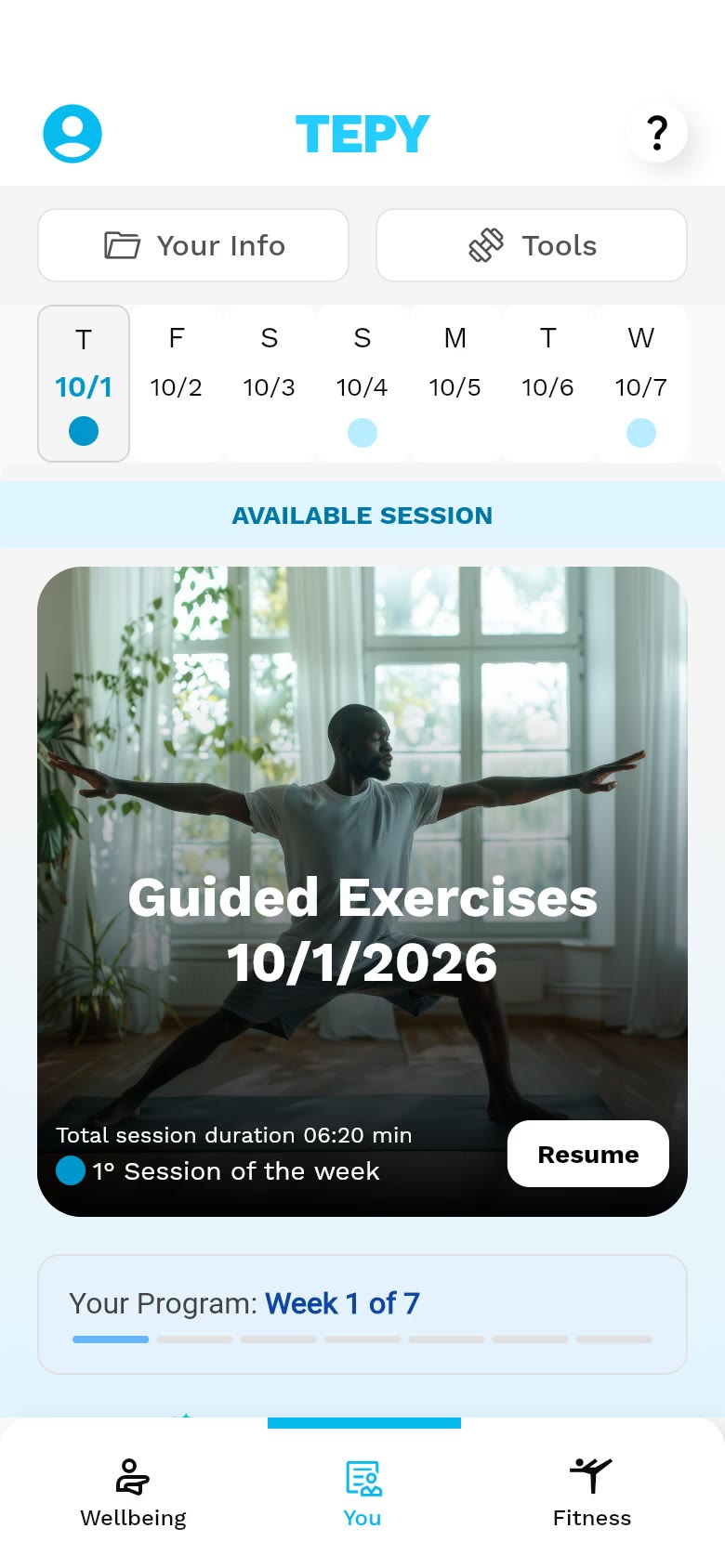
Every session is a playlist of short videos with a timer, sets and repetitions and spoken cues. Around the plan sit routines for the day (warm-up, cool-down, mobility, muscle recovery, a pause at the desk) and a progress screen that keeps count.
- 95%
- of the app’s commits are mine (547 of 574)
- 65k
- lines of Dart, excluding generated code
- 7
- languages in the interface
- 3 yrs
- of continuous development, since May 2023
Walkthrough
The app, in motion
Pick a recording, or jump straight to a chapter.
Recorded from the current code at phone size, on a stand-in back end with the app’s own exercises and videos. No sound.
What it does
From “it hurts here” to a plan you follow
01
An onboarding that sets up the plan
Apple or Google sign-in, or a company code for employees of partner companies. Consent comes with a plain explanation of what the algorithm does and does not do. Then a short profile (age, body, the kind of work day, how active you are, sports and the tools you own), which the back end uses to pick exercises.
02
Pain, located on a 3D body
The body can be rotated and zoomed until the tap lands on the exact spot, which the back end resolves to a zone. Intensity on a 0–10 scale with a description for every level, how long it has lasted, the sensations around it, and which movements hurt and at what point, each test shown as a looping video.
03
A plan that follows the pain
The highest pain level decides the length of the plan, from three to about seven weeks, and which days are self-massage, exercises or rest. When the pain points change, the plan asks to be recalculated; the week strip shows what is due and what is done.
04
Sessions as full-screen video
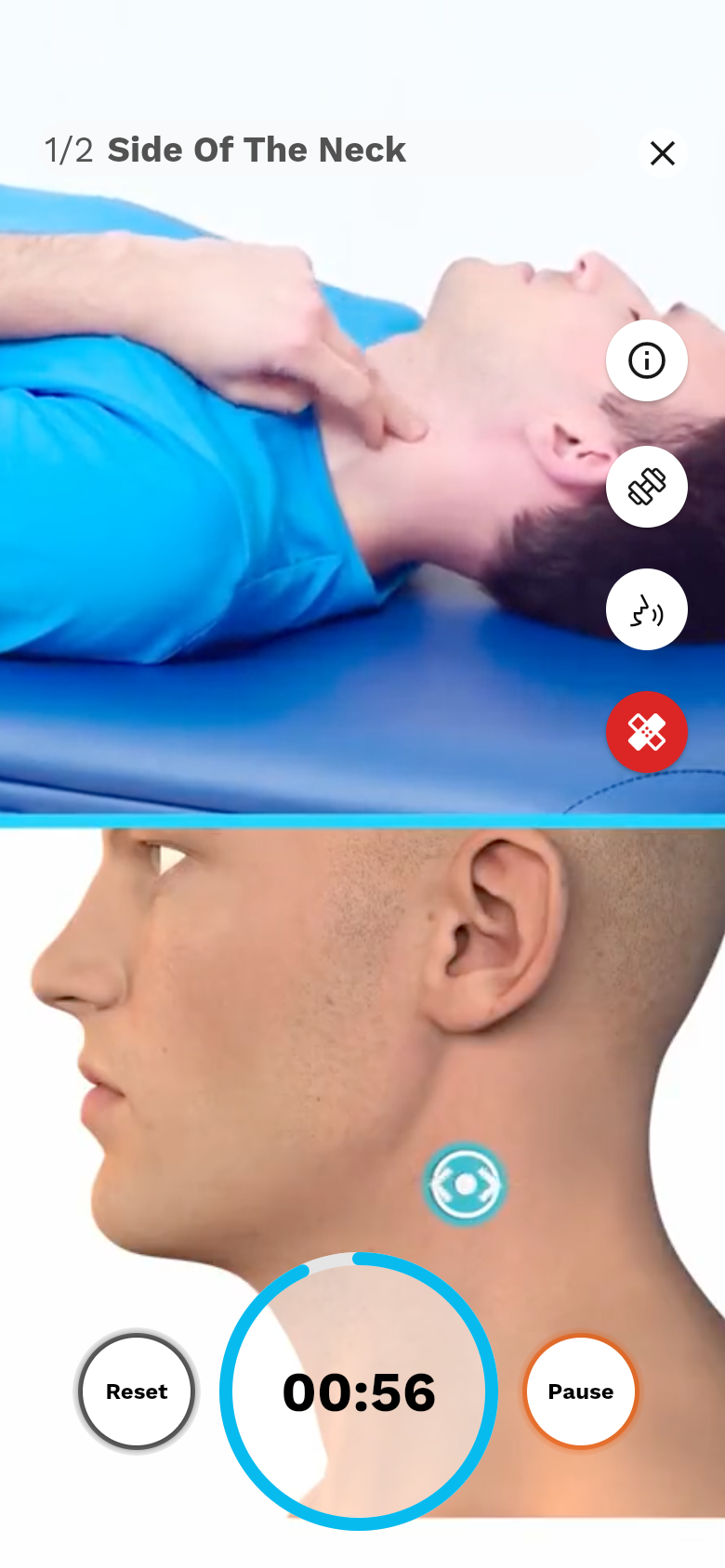
A session is a playlist. Each exercise plays full screen with a timer or a repetition count, the details a swipe away and spoken cues; the next one is a swipe up. Leaving halfway keeps the progress for later.
05
Routines for the rest of the day
Warm-up, cool-down, mobility and muscle recovery are built on request from the body areas to work on and the tools at hand. The wellbeing area adds short routines for the morning, the desk and the evening.
06
Progress and subscription
Streak, time spent, exercises done and a wellbeing score keep the plan honest. Full access is a subscription through the App Store or Google Play, verified on the server before anything unlocks.
Under the hood
How it was built
State and navigation
Riverpod throughout, with generated providers and immutable models (freezed, json_serializable). One go_router redirect decides every entry point (sign-in, consent, profile completion, forced update), so a deep link or a restart always lands where the account actually is.
Firebase, and the functions behind it
Auth for Apple, Google and email-link sign-in; Firestore for the user’s plan, sessions and progress; Crashlytics and Analytics. The Cloud Functions I wrote alongside the app verify App Store and Google Play subscriptions on the server, synthesise the spoken cues and send the scheduled reminders. The clinical logic (assessments, programmes, exercise selection) lives in a REST API built by the back-end team.
Keeping a health app shippable
Integration tests with Patrol on the iOS simulator and on a 16 KB-page Android emulator, the configuration Google Play now requires. A compliance pass for the EU AI Act and medical-device rules: disclosure labels, consent wording, and nothing that reads as a diagnosis.
Recording a live app
The app is real. Everything it shows is not.
TEPY has real users, real health data and a paid subscription behind it. None of that belongs in a portfolio, so the recordings use a copy of the current code that runs on its own.
- 1
The current code, built for the browser
A Flutter web build at phone size, told it runs on an iPhone. What only exists on a phone (the App Store, push notifications, the tracking prompt, crash reporting) is replaced by small stand-ins.
- 2
Firebase without Firebase
Sign-in and the database run on the in-memory fakes the project already uses in its tests; one of them needed a two-line patch to work in a release build. A switch in the address loads either a first launch or a returning user with a few weeks of history.
- 3
A stand-in for the REST API
The HTTP client is swapped for one that answers inside the app, with the routes and JSON shapes the models expect: pain zones, movement tests, plans, routines and twenty of the service’s exercises, with the names and key points its catalogue gives them.
- 4
The app’s own media, recorded offline
The pictures and the sign-in video are the ones bundled with the app. The exercise, movement-test and self-massage videos, their thumbnails and the icons come from the CDN the app streams them from: fetched once by a script, scaled down and bundled with the demo. The recorder refuses any request that leaves the machine, so a take cannot reach the real service.
The logo, the interface, the 3D body model, the pictures, the exercises and their videos are the app’s own. The user, the pain points, the plans and the progress are sample content made for this portfolio.
No demo to try here: TEPY is a live product, so this page shows recordings of a copy that runs on its own.
Every screen
The full set of screenshots
Sign-inApple, Google or a company code. The background is a looping video. How it works, and consentWhat the algorithm does and does not do, before anything else. ProfileDate of birth, weight and height on native-style pickers. Work dayPosture during the day shapes the programme. SportsSearchable list; the choice tunes warm-ups and recovery. Profile completeNext step: record where it hurts, now or later. SubscriptionStore products with localised prices (sample prices in the demo). SubscribedThe purchase is confirmed by the backend before the app unlocks. HomeThe plan for the week, starting today. TodayThe week’s plan and today’s session. The exact spotZoomed view: the point is resolved to a body zone by the backend. How muchPain intensity on a 0–10 scale, with a description for each level. What it feels likeSensations around the painful area. Which movements hurtEach suggested test plays as a looping video. Where in the movementAt which point of the movement the pain starts. SummaryEverything recorded for this pain point, editable before confirming. Plan out of dateThe pain points changed: the plan asks to be recalculated. New planSelf-massage and exercise days follow the pain level. Today’s sessionThe playlist of the day, with timings and cues. PlayerFull-screen, swipe up for the next exercise, timer and audio cues. Fitness areaMobility, muscle recovery, warm-up and cool-down. Areas to work onThe routine is built from the chosen body areas… Tools at hand…and from the tools the user has. Mobility routineThe generated playlist. ExerciseTimer, sets and repetitions, exercise details on demand. Wellbeing areaSelf-massage, guided exercises and short routines for the day. ProgressStreak, time spent, exercises done and a wellbeing score. MenuPlan and subscription, tutorials, legal pages.
Next case study
Re.corder →