CoachEval
Weekly evaluations for a sports club’s young athletes: a deck of cards for the coaches, words for the families.
- Role
- Everything: product design, the Vue web app, the .NET API, the database and the server
- Client
- A tennis coach and club owner
- Period
- 2026 – today
- Platforms
- Web app installable on the phone (PWA); a Flutter companion app in progress
The product
CoachEval follows the young athletes of a sports club through the season. Once a week the coaches rate what they saw, in a deck of cards that takes a few minutes; from those ratings the app draws each athlete’s card, the squads’ trends and ideas for the next training. Around it sit the club’s calendar, the call-ups, line-ups and team sheets of match day, and a board where each family sees its own child’s week.
I built it on my own for a tennis coach who runs a club: the product and its interface, the API, the database and the server it runs on. It started with tennis and now handles football too.
- 100%
- of the commits are mine (536 since July 2026)
- 92k
- lines of C#, Vue and TypeScript, excluding tests and migrations
- 1.7k
- automated tests: 901 on the API, 795 end to end in the browser
- 2
- sports, tennis and football, in Italian and English
Walkthrough
The app, in motion
Pick a recording, or jump straight to a chapter.
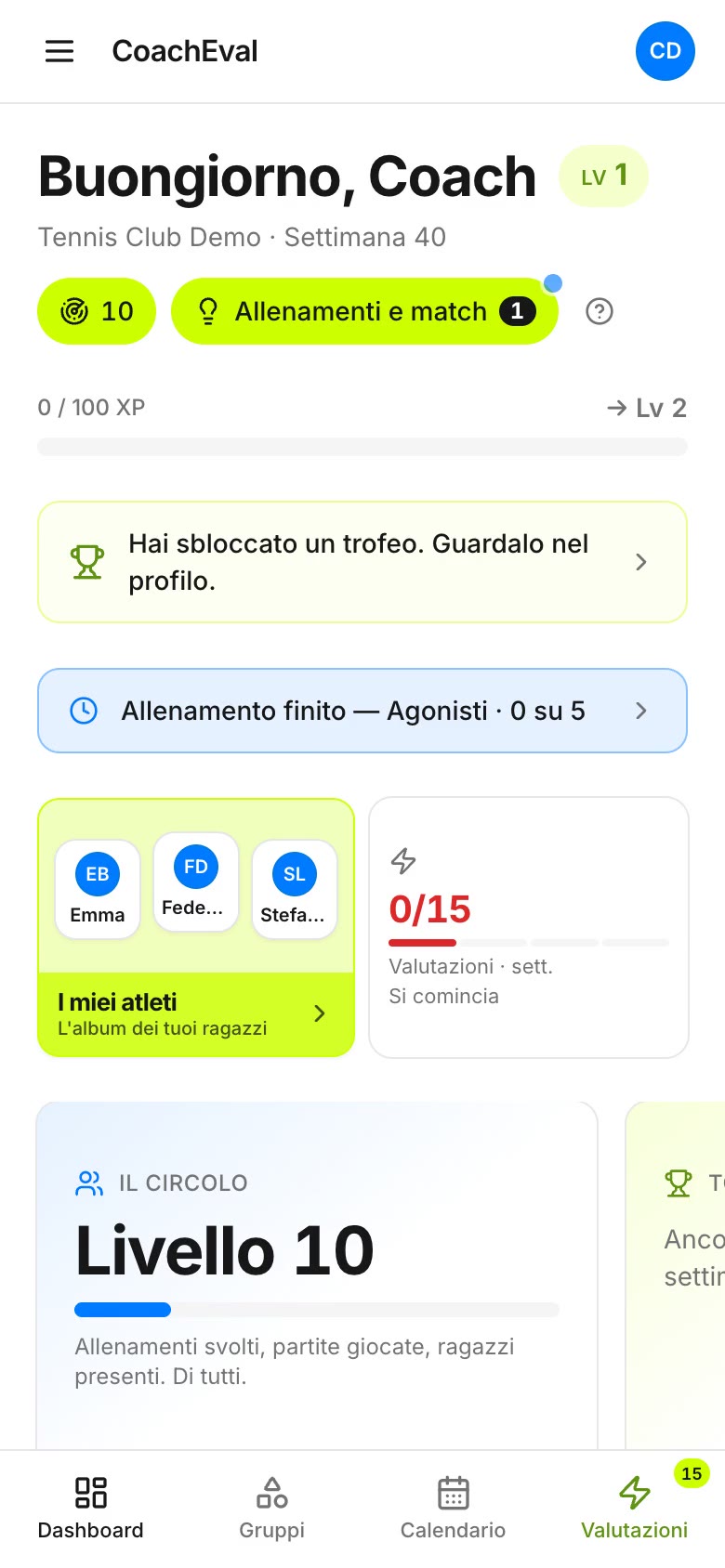
Recorded from the current release at phone size, the way the coaches use it, on a local copy with the demo clubs. Shown in Italian, the language of its clubs. No sound.
What it does
From a week’s ratings to a family’s board
01
The week in a deck
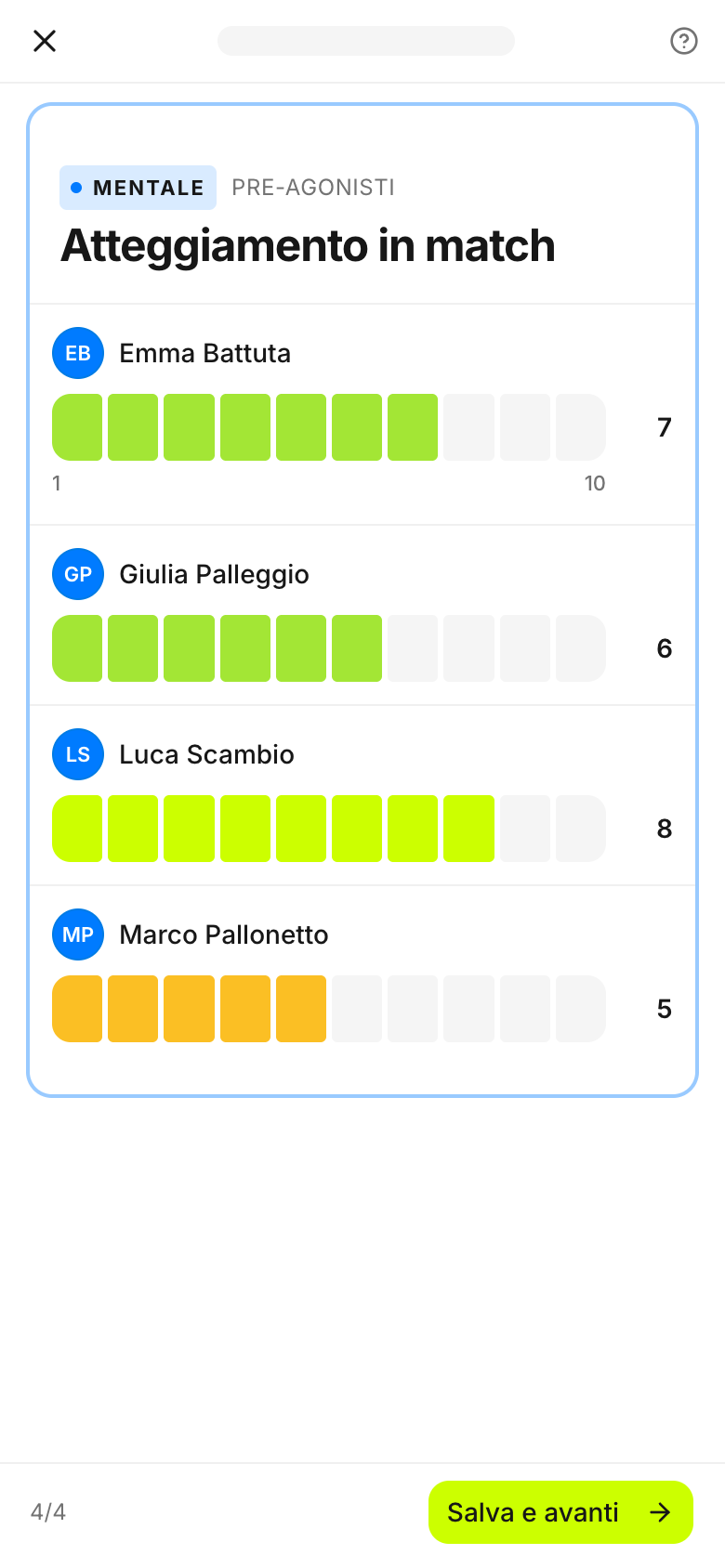
Coaches rate their athletes once a week, card by card. Each card is one attribute (the forehand, footwork, attitude in matches) across one squad, rated 1 to 10 with a tap on a bar: comparing a squad on the same thing is faster and fairer than opening each athlete in turn. Whoever was not seen is left alone: nobody gets a mark by default. The deck is sized from the season’s plan and ends when the week’s target is met; experience points and milestones keep the habit going.
02
An athlete card
The club’s athletes as an album of cards. Each opens on the average and the areas, then the four dimensions (technical, tactical, physical, mental) with their trend and each attribute’s latest mark. “Quanto lo conosciamo” (how well we know him) measures the observing, not the athlete: it grows when a coach looks, and says where to look next.
03
Radar and the training register
The Radar is a feed of what has changed in the coach’s squads: who has been seen too little on an attribute, a squad’s strength or weak spot, a trend, a drill for the next training. Cards about a squad come from aggregates and never single out a child. The lightbulb lists the trainings and matches still to close; yesterday’s training takes three taps.
04
Match day
In the football demo club: the call-up starts from the previous one, with shirt numbers and the captain, and comes with a message for the players with meeting time and place. The line-up goes onto a pitch, each player with role and strongest attributes, and is shared with the squad’s staff as a link, so the names stay in the app. The team sheet for the referee fills itself from the roster and is printed: nothing typed on it is ever stored.
05
The family board
Parents get in with a six-digit code sent to the address the club has: no password to invent. They see their own child’s week, calendar and call-ups, and nobody else’s. The card speaks in words (strengths, the next step), never in marks, and tokens earned by turning up dress it. A two-tap check-in tells the coaches how the week went, and whether to talk.
Under the hood
How it was built
A functional core
Every number the product computes (the week’s workload, who to observe first, the season’s calendar, levels and streaks) is a pure function in the application layer, tested without a database; the API endpoints around it do the input and output. Invariants live on the entities themselves: a photo cannot be attached without consent on file, whichever endpoint tries.
One database, many clubs
Clubs share one PostgreSQL database: every club-scoped row carries its club, and an EF Core global query filter (Finbuckle.MultiTenant) applies it to every query. Roles are grants read from a single table and checked exhaustively, so a new role that nobody has classified stops the app at startup instead of inheriting someone else’s access.
Designed around minors
The app holds records on children, so the design starts there. No health data at all (availability is a yes or a no, never a why); photos served only behind authentication; the team sheet never stored; families shown words instead of numbers; no ranking of coaches; error reports that carry the route, never a person. Tests pin the rules down: the team sheet’s, for one, fails if anything typed on it leaves the browser.
From the phone to the server
A Vue 3 PWA in TypeScript (Pinia, Tailwind, shadcn-vue) with types generated from the API’s OpenAPI description; .NET 8 and EF Core on PostgreSQL; Italian and English throughout. It runs in Docker on an ARM server on Oracle Cloud, behind Cloudflare, with self-hosted error tracking, and clubs can sign up on their own: a verified address and the service contract accepted online. A Flutter companion app is in progress.
Recording a live product
Its own code, its demo clubs, nobody real
CoachEval is in use, with records on minors. None of that belongs in a portfolio, so the recordings run the app’s current code on a database built on my machine for the purpose.
- 1
A copy of the code
The web app and the API of the current release run on my machine in Docker, with a fresh PostgreSQL database. The browser that records may talk to that API and to nothing else.
- 2
The demo clubs it ships
The code seeds two showcase clubs, tennis and football, made to look fictional at a glance: every surname is a term of the sport (Rovescio, Smorzata, Contropiede), every address is @example.com. I opened a season and accepted the club’s agreement as an owner would, through the app’s own API.
- 3
Every take from the same week
A take saves ratings, a call-up, a line-up, a family session. Before each one the database goes back to a snapshot, so every recording starts from the same state.
- 4
Shown in Italian
The app speaks Italian and English, but the sport’s catalogue and the clubs are Italian, so it is recorded in Italian, as its coaches see it.
The interface is the app’s own. The clubs, coaches, athletes, families, ratings and matches are the synthetic demo data that ships with its code.
No demo to try here: CoachEval is a live product holding records on minors, so this page shows recordings of its demo clubs.
Every screen
The full set of screenshots
One card, one attributeThe whole squad on the same attribute, rated 1 to 10: comparing is faster and fairer than opening each athlete. Week doneThe week’s target reached: back on the dashboard, the count is full. More cards are there for whoever wants them. The albumThe roster as cards, with when each athlete was last observed. The athlete cardAverage and areas for the staff: the numbers are the coaches’ working tool, never shown to families. A dimension, openedEach attribute with its latest mark and which way it moved. How well we know himHow complete the observation is, not how good he is: it grows when a coach looks. Who to observeAthletes seen too little on an attribute: today’s focus. A squad’s strengthSquad cards come from aggregates: no child is singled out. Trainings and matchesWhat to close, and what is on today. Closing a trainingIntensity, participation and attention, in three taps. The matchCall-up, line-up and team sheet, from one place. Call-upProposed from the previous one: who is called, shirt numbers, the captain. Sharing the call-upMeeting time and place are kept on the match; the message for the players is ready to send. Line-upPlayers on the pitch, each with role and strongest attributes. Team sheetPre-filled from the roster, printed for the referee. Nothing typed here is saved. Family accessA code to the address the club has on record. No password to invent. The child’s weekCalendar and call-ups for this child only. The cardStrengths and the next step in words; tokens for showing up dress the card. Weekly check-inHow the week went, and whether to talk to the coach: two taps, read by the squad’s coaches.
Next case study
Indennizzo Diretto →