Photo2Post
Photo retouching by professional artists, ordered from the phone: pick a service, send your photos, get them back retouched.
- Role
- Flutter developer: the 4.0 redesign, the move to credits and payments, orders, the archive and folders, and every release since June 2025
- Client
- Image Retouch srl
- Period
- 2025 – today
- Platforms
- iOS and Android from one Flutter codebase
The product
Photo2Post is retouching done by people, not filters. A host who needs the flat to look its best on a listing, a shop owner with products to put online, someone with a portrait to fix: they choose a service in the app, send the photos with a note, and a few hours later the photos come back from the studio's artists, each in two retouched versions, to compare with the original and rate.
The app is how customers order and pay. Retouching is paid in credits, bought in packages by card, Apple Pay or Google Pay through Stripe, or with PayPal; every finished photo stays in an archive, to download, share or sort into folders. I joined in June 2025, redesigned the app as version 4 and have been its developer since.
- 77
- of the 80 commits since June 2025 are mine
- 49%
- of today's lines of Dart were last written in my commits
- 31k
- lines of Dart in the app, excluding generated code
- 2
- retouched versions of every photo, from the studio's artists
Walkthrough
The app, in motion
Pick a recording, or jump straight to a chapter.
Recorded from the released code at phone size. A virtual studio stands in for the artists: it sends the drawn "after" versions of the sample photos back when the recording script asks, and the app notifies the customer as the push notification would.
What it does
From a photo on the phone to a retouched one
01
Choosing what to retouch
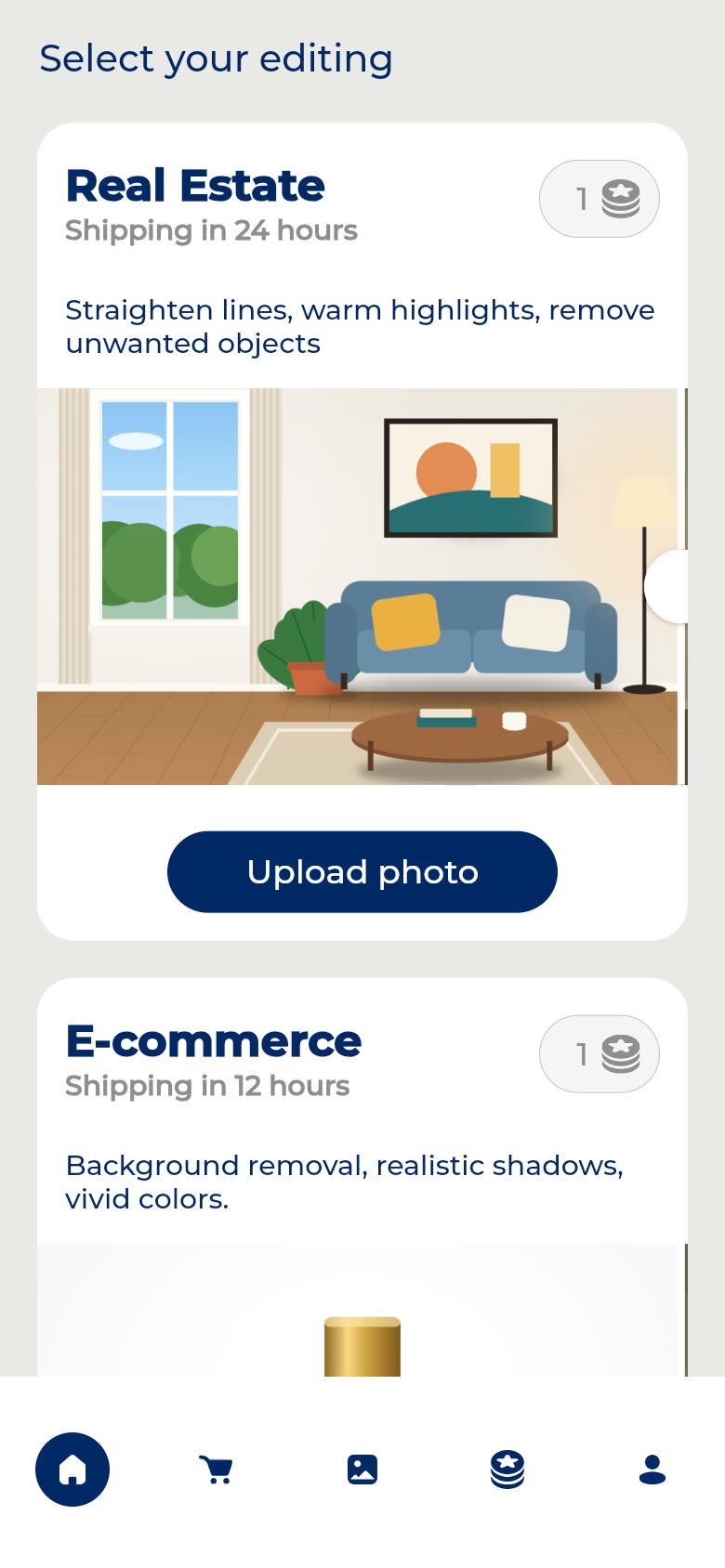
The home page is the catalogue: each service with a before-and-after example that slides by itself, the delivery time and the price in credits per photo. The customer picks one and adds photos from the camera or the library.
02
The cart and the order
One line per photo, each with a note for the artist ("straighten the walls", "take the boxes out"), checked for links, e-mail addresses and bad words before it is sent. Confirming uploads the photos, takes the credits from the account and hands the order to the studio.
03
Signing up when it matters
The catalogue and the cart work without an account; it is asked for at the first order, as a private customer or a business. Apple, Google, Facebook or e-mail, with the consents, and two free credits to start. A customer who has not bought yet is offered a welcome package with a fifteen-minute countdown.
04
Back from the studio
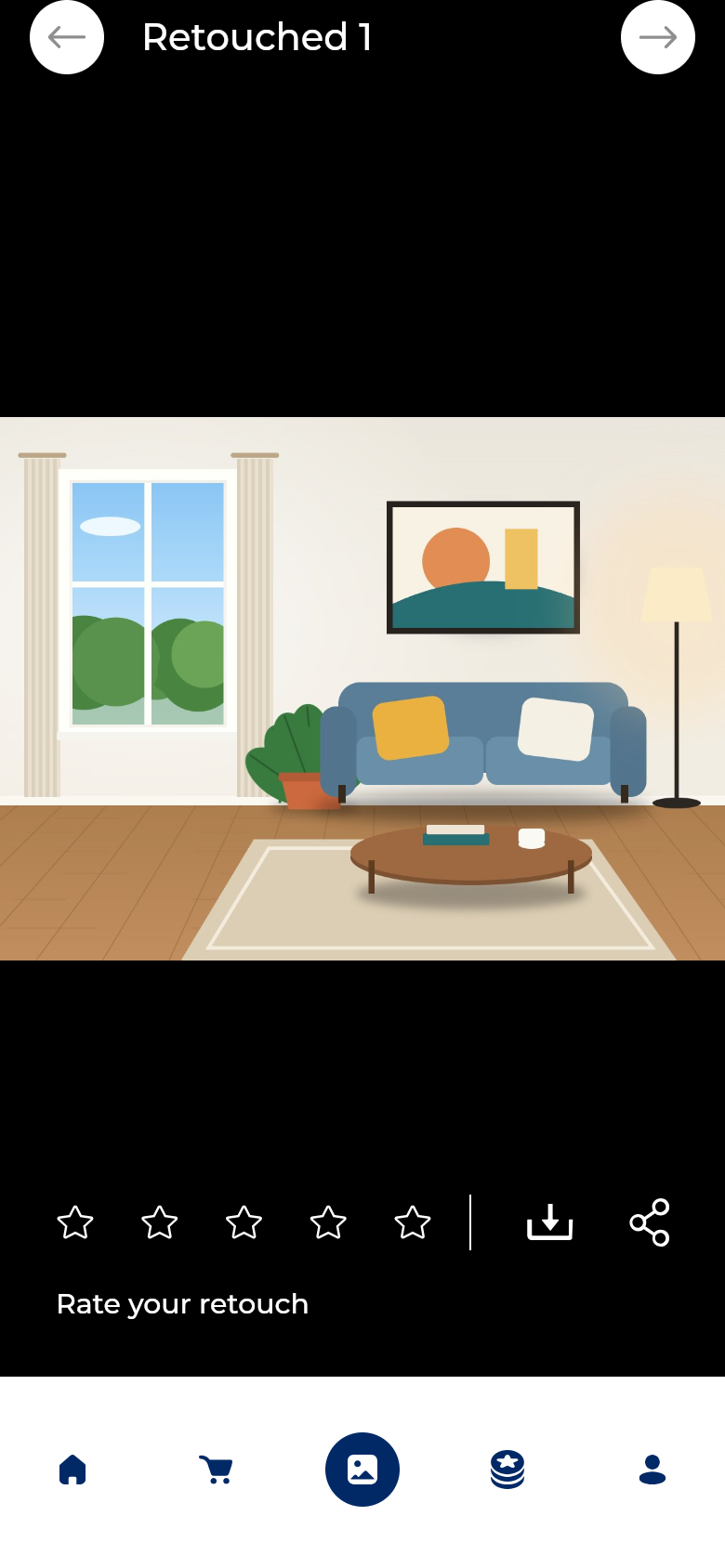
A notification says the photos are ready and opens the order. Each photo can be seen as sent and in its two retouched versions, rated with stars, downloaded or shared.
05
An archive, and folders
Orders by month, in progress or completed; an archive of every retouched photo with a download button on each; and folders the customer makes on the phone (for a listing, for a shop), shared or downloaded all at once.
06
Credits
Packages priced per credit, a discount code checked on the server, the VAT shown, then the saved card, Stripe's payment sheet, Apple Pay, Google Pay or PayPal. The credits are in the account as soon as the payment goes through.
Under the hood
How it was built
A redesign, then a new way to pay
Version 4 rebuilt the screens the customer goes through: sign-in and sign-up, the services page with its before-and-after examples, the cart, orders, privacy and terms. Then the app moved from paying for each order to credits: packages, the checkout with discount codes, the welcome offer, the rules for free credits and when to suggest buying more.
Firebase and the order pipeline
GetX for state, routing and dependencies; Firebase Auth with custom claims for the customer role; Firestore for services, users, orders and their details; Cloud Storage for the photos and their thumbnails; Cloud Functions to confirm an order, check a discount code and record a rating. The app writes a pending order with its details and uploads, and a function turns it into an order for the studio.
Keeping it on the stores
Every release since June 2025, from build 70 to build 106, with the fixes that come with a live app: photo permissions on iOS, the keyboard over the cart's notes and the checkout, sign-in retries on slow networks, a notification that opens the right order.
Recording a live app
The app is real. The photos are drawn.
Photo2Post has real customers, their photos and their payments. None of that belongs in a portfolio, so the recordings use a copy of the released code that runs on its own, with a stand-in for everything behind it.
- 1
The released code, built for the browser
A Flutter web build at phone size, told it runs on an iPhone. The app keeps photos, the cart and thumbnails in files, which a browser does not have, so the demo gives it a file system in memory; push notifications, analytics and crash reporting are switched off.
- 2
Firebase, Stripe and a studio, inside the page
Sign-in and Firestore run on the in-memory fakes Firebase projects use in their tests, seeded with a catalogue and a returning customer; Storage and the Cloud Functions are answered by small stand-ins. Stripe's API is answered with a test card, and its payment sheet is drawn by the demo. A virtual studio sends orders back and raises the notification.
- 3
Drawn photos
The company's example photos and stock pictures stay out. A script draws ten scenes (rooms, products, dishes, a beach, a portrait, a city), each as the customer's crooked, dim, cluttered "before" and as two retouched versions, and the phone's photo library is a picker of those.
- 4
Recorded offline
The recorder refuses any request that leaves the machine, so a take cannot reach the real service.
The logo, the interface, its icons and illustrations and the credit packages are the app's own. The photos, the catalogue of services, the customers, orders, folders and the payment card are sample content made for this portfolio.
No demo to try here: Photo2Post is a live product, so this page shows recordings on sample content.
Every screen
The full set of screenshots
ServicesEach service with a before and after example, its price in credits and delivery time. More servicesFood, portraits, removing objects, creative retouching. Choosing photosThe phone's photo library (drawn for the demo). CartOne line per photo, with a note for the artist. AccountTwo free credits to start; Apple, Google, Facebook or e-mail. Sign-upName, e-mail, a strong password and the consents. Order sentThe photos go to the studio; the credits are taken from the account. In progressThe order, with the artist working on it. Photos readyThe push notification when the artists are done. Welcome offerFor a customer who has not bought credits yet: a package at a discount, for fifteen minutes. RetouchedEach photo comes back in two retouched versions, to compare with the original. OrdersOrders in progress, grouped by month, with the artist's picture. OriginalThe photo as it was sent. RetouchedRated with stars; downloaded or shared from here. CompletedEvery order delivered. ArchiveAll the retouched photos, ready to download. FoldersPhotos sorted into folders on the phone, downloaded all at once. A folderThe photos for a listing. Credit packagesPackages with the price per credit. CheckoutA discount code, VAT and the ways to pay. Saved cardThe saved card, or another way to pay. Payment sheetStripe's payment sheet (drawn by the demo, test card). PaidThe credits are added to the account. ProfileName, the default card, help, notifications and the account.
Next case study
Criluma Viaggi →